How I Build the Backend for Modern Websites
A practical look at how I build the backend for modern websites, covering APIs, databases, authentication, server-side logic, integrations, security, testing and deployment.
- Author
- Hasnain Ansari
- Published
- Reading time
- 9 min read
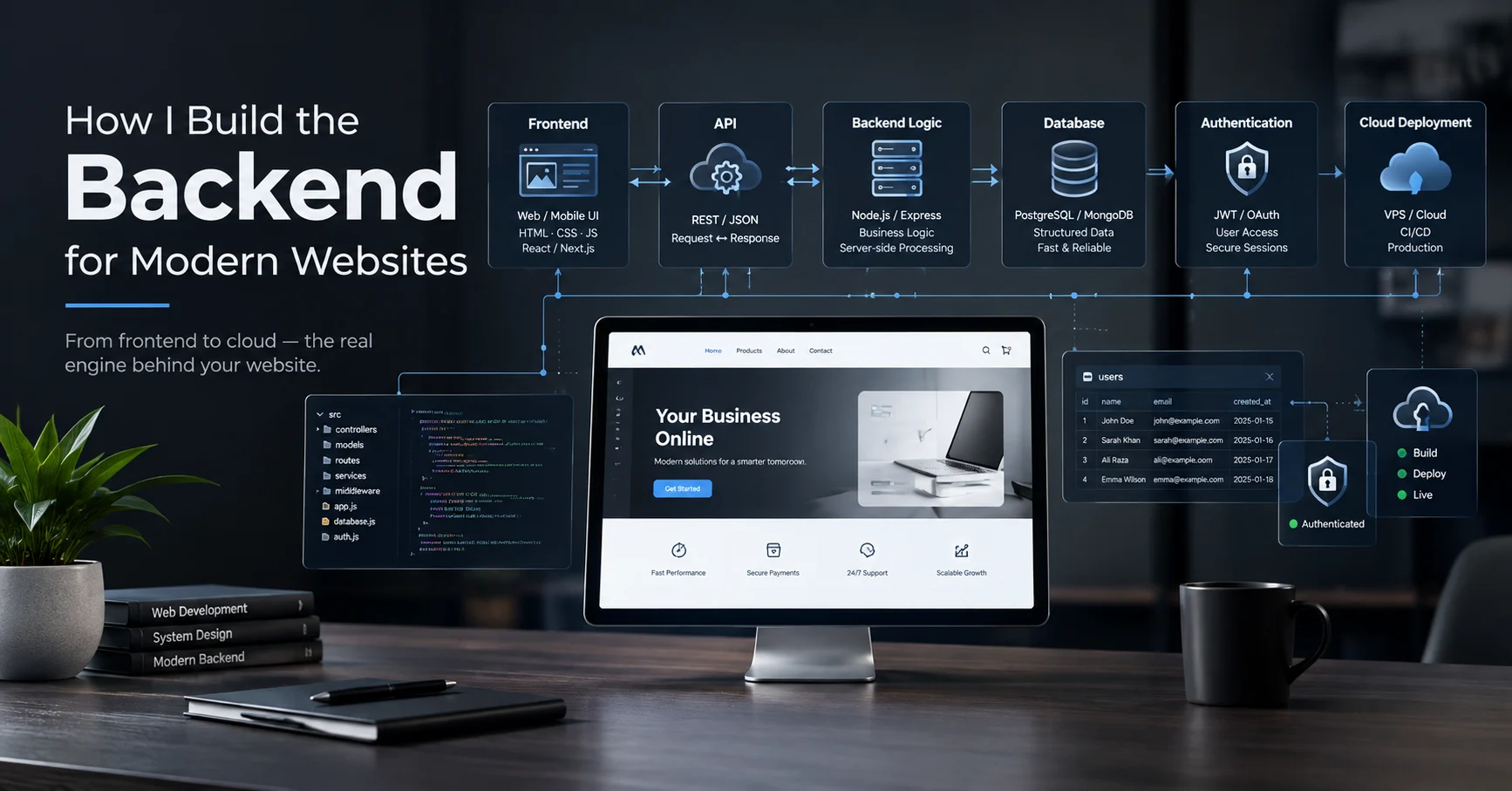
A website can look great on the surface, but many of the features users interact with depend on what happens behind the interface.
Forms need somewhere to send data. Login systems need authentication. Dashboards need databases. Search, filters, notifications and other dynamic features often require APIs and server-side logic.
That is where the backend comes in.
When I build a modern website, I treat the backend as part of the overall product rather than something added after the frontend is finished. My approach depends on what the website actually needs, but the core process usually involves understanding the data, designing the backend structure, connecting the frontend, securing access and deploying everything correctly.
Here is how I approach it.
1. I Start With the Website Requirements
Before creating databases or APIs, I first identify what the website needs to do.
A simple portfolio website may only need a contact form and basic content management. A business application might require user accounts, dashboards, databases, admin controls and multiple levels of access.
I usually break the requirements into questions such as:
- What information needs to be stored?
- Who can create or edit that information?
- Who can view it?
- Does the website require user accounts?
- Does the frontend need an API?
- Are there third-party services involved?
- Does the project need an admin panel?
- What happens when something goes wrong?
This gives me a clearer picture of the backend architecture before I start building.
2. I Design the Data Structure
The database is one of the most important parts of a data-driven website.
Instead of creating tables randomly, I think about what entities the application actually needs and how they relate to each other.
For example, a task-management application might have:
- Users
- Tasks
- Task assignments
- Reports
- Activity records
Each table can contain the information required for that specific entity, while relationships connect the different parts of the application.
A well-planned database makes it easier to build features later and reduces unnecessary duplication or complicated queries.
3. I Build the Database
Once the structure is clear, I create the database and its tables.
Depending on the project, I may use a managed backend platform such as Supabase or another database/backend solution.
Typical database considerations include:
- Unique IDs
- Relationships between tables
- Required fields
- Timestamps
- User references
- Data validation
- Permissions
- Indexing where necessary
The goal isn't simply to store information. The database should support the way the application actually works.
4. I Connect the Frontend Through APIs
The frontend and backend need a way to communicate.
This is where APIs become important.
For example, when a user submits a form, the frontend can send a request containing the required information. The backend processes that request and interacts with the database before returning an appropriate response.
A simplified flow looks like this:
User → Frontend → API → Backend Logic → Database → API Response → Frontend
The same concept can be used for retrieving, creating, updating or deleting data.
I try to keep this communication structured so that the frontend doesn't need to understand how the database itself works.
5. I Add Authentication When the Project Needs It
If a website has accounts, dashboards or private information, authentication becomes an important part of the backend.
Authentication answers:
"Who is this user?"
Authorization answers:
"What is this user allowed to do?"
These are different things.
For example, in an application with admin and staff accounts, both users may successfully log in, but they shouldn't necessarily have access to the same features.
The admin might be able to:
- Add staff
- Assign tasks
- Edit records
- View reports
- Manage users
While a staff member may only be able to access their own tasks and submit completed work.
This is where authentication and role-based authorization work together.
6. I Implement Server-Side Logic
Not everything should happen inside the browser.
Some operations require backend logic to validate data, check permissions, process requests or perform actions that shouldn't be exposed to the client.
For example, before allowing someone to update a record, the backend can verify:
- The user is authenticated.
- The submitted data is valid.
- The user has permission to perform the action.
- The requested record exists.
- The operation is allowed.
Only after those checks should the requested operation be performed.
This helps keep application logic organized and reduces the amount of sensitive logic exposed to the frontend.
7. I Handle CRUD Operations
A large number of web applications are built around CRUD operations:
Create → Read → Update → Delete
For example, an admin dashboard might allow an administrator to:
- Create a new task
- View existing tasks
- Edit task information
- Delete an incorrect task
These operations connect the user interface to the backend and database.
I make sure each operation has appropriate validation and permission checks instead of treating database operations as unrestricted actions.
8. I Add Third-Party Integrations When Required
Modern websites often communicate with services outside their own backend.
Depending on the project, this could include:
- Email services
- Payment providers
- Analytics platforms
- AI services
- Maps
- Cloud storage
- External APIs
The important part is deciding where the integration should happen.
For example, sensitive API keys should not simply be placed inside frontend JavaScript where users can inspect them.
Instead, sensitive operations can be handled through server-side logic or secure backend functions.
9. I Think About Security From the Beginning
Backend security isn't something I want to add at the very end.
Some of the areas I consider include:
- Authentication
- Authorization
- Input validation
- Database permissions
- API access
- Environment variables
- Sensitive credentials
- Error handling
- Data exposure
One simple rule I follow is that anything sensitive should be treated as sensitive from the beginning.
API keys, database credentials and other secrets should be stored securely rather than hard-coded into publicly accessible frontend code.
10. I Handle Errors Properly
A backend isn't useful if it only works when everything goes perfectly.
Requests can fail. Users can submit invalid information. A database can temporarily become unavailable. An external API can return an error.
Instead of allowing these failures to produce confusing results, I try to handle them explicitly.
The frontend should receive useful responses that allow it to show an appropriate message or state.
For example:
Successful request → Show the updated data
Validation error → Tell the user what needs to be corrected
Unauthorized request → Ask the user to authenticate or deny access
Server error → Show a safe error message and avoid exposing internal details
Good error handling makes applications much easier to use and maintain.
11. I Connect the Backend to the Frontend
Once the backend functionality is ready, I connect it with the actual interface.
This is where the website becomes a working application rather than just a collection of screens.
For example:
A dashboard loads → frontend requests data → backend processes the request → database returns records → frontend displays them.
The same process happens when users submit forms, update information or interact with application features.
I pay attention to loading states, empty states and error states as well because users don't always interact with a system when everything is immediately available.
12. I Test the Complete Flow
Testing isn't only about checking whether a button works.
I also test the complete data flow.
For example:
Login → Authentication → Dashboard → Database Request → Display Data → Update Record → Database
I check both normal and incorrect scenarios.
Questions I consider include:
- What happens with invalid input?
- What happens without authentication?
- Can one user access another user's data?
- What happens when a record doesn't exist?
- Does the UI update after a database change?
- What happens when an API request fails?
Testing these scenarios helps identify problems before deployment.
13. I Prepare the Project for Deployment
A backend that works locally still needs to be configured properly for production.
Depending on the architecture, deployment can involve:
- Frontend hosting
- Backend hosting
- Database configuration
- Environment variables
- API configuration
- Domain configuration
- HTTPS
- Production settings
Cloud platforms can simplify many of these processes because infrastructure such as databases, authentication and hosting can be managed through online services.
The exact setup depends on the project rather than following one fixed deployment method.
14. I Keep Development and Production Separate
During development, I may use test data, development credentials and local configuration.
Production should use its own environment and production credentials.
Keeping these environments separate reduces the risk of accidentally modifying live data while developing or testing a feature.
Environment variables are particularly useful for keeping configuration and secrets outside the source code.
15. I Monitor and Improve the Backend
Deployment isn't the end of backend development.
Once a website is live, real usage can reveal problems that weren't obvious during development.
I may need to investigate:
- Slow database queries
- Failed API requests
- Unexpected errors
- High resource usage
- Authentication issues
- Poorly optimized operations
As the application grows, the backend may also need improvements to its database structure, queries, caching or infrastructure.
A good backend should be able to evolve with the product.
My Typical Backend Workflow
My overall process can be summarized as:
1. Understand Requirements
Determine what the website needs to store, process and protect.
2. Plan the Architecture
Decide how the frontend, backend, APIs and database will communicate.
3. Design the Database
Create the required tables, relationships and data structure.
4. Build Backend Logic
Implement APIs, server-side operations and business rules.
5. Add Authentication
Set up login, sessions and role-based access where required.
6. Connect the Frontend
Integrate the website interface with backend functionality.
7. Test
Check normal flows, errors, permissions and edge cases.
8. Deploy
Configure hosting, environment variables, database and production services.
9. Monitor and Improve
Review real-world performance and improve the system as needed.
The Backend Depends on the Project
There isn't one backend architecture that makes sense for every website.
A simple portfolio doesn't need the same infrastructure as a large SaaS application.
For some projects, a managed backend platform can reduce development and infrastructure overhead. For others, a custom server and more control over the infrastructure may make more sense.
I choose the approach based on factors such as:
- Project complexity
- Required features
- Expected traffic
- Database requirements
- Authentication needs
- Development time
- Maintenance requirements
- Scalability
- Budget
The objective is to build enough infrastructure to support the product without creating unnecessary complexity.
How AI Fits Into My Backend Workflow
I also use AI tools during development, particularly for research, debugging, code exploration, documentation and repetitive development tasks.
But I don't treat AI output as automatically correct.
Backend development involves databases, authentication, permissions and sensitive application logic. Generated code still needs to be reviewed, tested and adapted to the actual architecture.
For me, AI is an accelerator for development rather than a replacement for understanding how the system works.
What Makes a Good Modern Backend?
A modern backend isn't simply about using the latest framework or cloud service.
I look for a backend that is:
- Structured
- Secure
- Maintainable
- Properly connected to the frontend
- Appropriate for the project's scale
- Easy to debug
- Designed around the actual data
- Capable of evolving as requirements change
The technology can change from project to project. The underlying principles remain much more consistent.
Final Thoughts
When I build a website, I think about both sides of the experience.
The frontend is what users see and interact with, while the backend handles much of the data, logic and infrastructure that makes those interactions possible.
APIs, databases, authentication, server-side logic and cloud deployment are all pieces of the same system.
My goal is to connect those pieces in a way that makes the website reliable, secure, maintainable and ready to grow.
For a simple website, that might mean a lightweight backend with a database and a few APIs. For a larger application, it could involve authentication, multiple user roles, complex database relationships, integrations and more advanced infrastructure.
The right backend is the one that fits the actual requirements of the website.
About the Author
Hasnain Ansari is an AI Creative Designer and Web Developer based in Delhi, India. He works across web design, frontend development, backend integration, UI/UX, SEO and AI-assisted creative workflows.
His web development work includes responsive websites, landing pages, database-driven applications, admin dashboards and full-stack projects. He focuses on combining design, technology and practical digital solutions to build modern web experiences.