How I Do SEO for a New Website From Scratch
A practical look at how I approach SEO for a new website, from keyword research and technical setup to on-page optimization, Google indexing, Search Console, performance and ongoing improvements.
- Author
- Hasnain Ansari
- Published
- Reading time
- 9 min read
Introduction
Launching a new website is exciting, but publishing the website is only the beginning.
If people can't discover the website through search engines, even a well-designed website can struggle to attract organic traffic.
That's why I think about SEO while building a website rather than treating it as something to add after development.
My approach starts with understanding what the website is about and who it needs to reach.
From there, I work through the technical foundation, content, on-page SEO, indexing, performance and monitoring.
My general process looks like this:
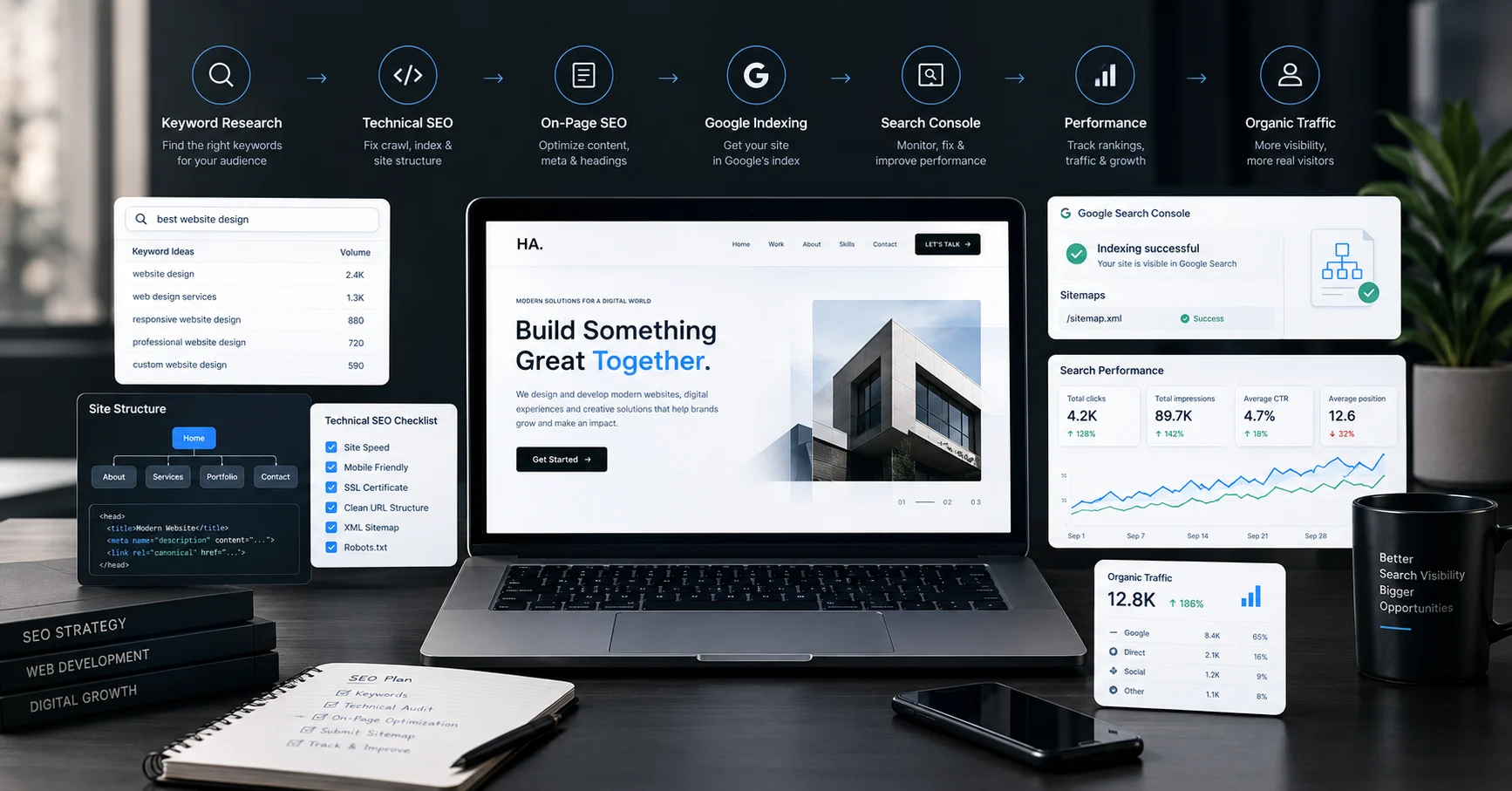
Research → Structure → Technical SEO → On-Page SEO → Content → Indexing → Performance → Monitoring → Improvement
SEO isn't a one-time task.
It's an ongoing process of making a website easier for search engines to understand and more useful for people.
1. Understand What the Website Is About
Before thinking about keywords, I first understand the website itself.
For example, a website could be for:
- A freelancer
- A local business
- An e-commerce store
- A service provider
- A portfolio
- A SaaS product
- A content website
Each type of website has different search intent.
A local business may need visibility for searches containing a location.
A portfolio may need to establish the person's name and professional services.
An e-commerce website needs product and category pages that can be discovered through search.
So the first step is understanding the business, audience, services and goals.
2. Identify the Right Search Terms
Once I understand the website, I start identifying the topics and search terms that are relevant.
I don't simply look for keywords with large search volumes.
I consider whether the search term actually matches what the website provides.
For example, if I'm optimizing a website for a web designer, relevant topics might include:
- Web designer
- Website designer
- Web development
- Website development
- UI/UX design
- Responsive web design
- Landing page design
- Web designer in Delhi
The exact keywords depend on the business and target audience.
The important thing is search intent.
Someone searching for "what is responsive web design" has a different intent from someone searching for "web designer in Delhi."
The content should match that intent.
3. Create a Logical Website Structure
SEO starts with the architecture of the website.
I make sure important pages are easy to reach through the site's navigation and internal links.
For example:
Home → Services → Web Design → Contact
A blog might follow:
Blog → Category → Article
A logical structure helps visitors navigate the website and gives search engines a clearer understanding of how pages relate to each other.
I also try to avoid creating unnecessary pages simply to target additional keywords.
Every page should have a purpose.
4. Optimize Page Titles
The page title is one of the first things I look at when optimizing a website.
A good title should clearly communicate what the page is about.
Instead of:
Home | Website
I might use something more descriptive, such as:
Hasnain Ansari | Graphic Designer, Web Developer & AI Visual Designer
The exact title depends on the page and its search intent.
I try to keep titles natural rather than filling them with repeated keywords.
5. Write Useful Meta Descriptions
Meta descriptions provide a short summary of a page.
They don't need to be written like a list of keywords.
Instead, I use them to explain what someone can expect to find on the page.
For example, a service page could describe the service, location or benefit in a concise way.
The goal is to make the search result understandable and relevant.
6. Use Proper Heading Structure
I also pay attention to heading hierarchy.
A page should have a clear structure:
H1 → H2 → H3
The H1 communicates the main topic of the page.
H2 headings divide the major sections.
H3 headings can organize subsections within those sections.
Headings aren't just an SEO technique.
They also make content easier for visitors to scan.
7. Optimize the Content
SEO content should answer the user's question or satisfy their intent.
I try to avoid writing content purely to include keywords.
Instead, I focus on:
- Clear explanations
- Useful information
- Relevant examples
- Natural keyword usage
- Good formatting
- Search intent
- Easy readability
If a page is targeting a service, the content should explain the service properly.
If it's targeting an informational search, it should answer the question directly.
The keyword is not the goal.
The useful answer is the goal.
8. Optimize Images
Images are important for both design and performance.
I make sure images have descriptive filenames and appropriate alt text when they provide meaningful information.
For example:
responsive-web-design-mobile-desktop.jpg
is more descriptive than:
IMG_4829.jpg
I also consider image dimensions and file size.
Large, unoptimized images can increase page weight and slow down the website.
So image SEO and image performance often go together.
9. Make the Website Mobile-Friendly
Mobile usability is an important part of modern websites.
I test layouts across different screen sizes and make sure:
- Text is readable
- Navigation works
- Buttons are usable
- Images fit correctly
- Content doesn't overflow
- Forms work properly
- Users don't need to zoom unnecessarily
A website can have strong content and metadata, but a poor mobile experience can still hurt the overall user experience.
10. Check Website Performance
Performance is another part of my SEO workflow.
I look at things such as:
- Image optimization
- JavaScript
- CSS
- Font loading
- Page weight
- Caching
- Lazy loading
- Layout stability
I also pay attention to metrics such as Core Web Vitals when evaluating page experience and performance.
The objective isn't simply to make a score look good.
It's to make the website genuinely faster and more responsive for users.
11. Create and Submit an XML Sitemap
For a new website, I make sure there is an XML sitemap containing the URLs that should be discovered and indexed.
For example:
https://example.com/sitemap.xml
I then use the appropriate search engine webmaster tools to submit or monitor the sitemap.
A sitemap doesn't guarantee that every URL will be indexed.
It simply provides search engines with useful information about the site's URLs.
12. Check Robots.txt
I also review the website's robots.txt file.
This file can provide crawling instructions to search engine bots.
For example:
https://example.com/robots.txt
I make sure important public pages aren't accidentally blocked.
At the same time, areas that shouldn't be crawled can be handled appropriately.
A small technical mistake here can create unnecessary SEO problems, so I always check it before launch.
13. Connect Google Search Console
For a new website, Google Search Console is one of the tools I consider essential.
It can help monitor things such as:
- Search queries
- Impressions
- Clicks
- Average position
- Indexing
- Sitemap status
- Search performance
- Page indexing issues
I use Search Console to understand how Google is seeing the website rather than relying only on assumptions.
It becomes particularly useful after the website starts receiving impressions.
14. Make Sure Important URLs Can Be Indexed
Getting a website online doesn't automatically mean every page will appear in Google.
I check important URLs and look for potential issues such as:
- Accidental
noindexdirectives - Incorrect canonical URLs
- Blocked crawling
- Redirect problems
- Duplicate pages
- Server errors
For important pages, I can use URL inspection tools to understand whether Google has discovered and indexed them.
Indexing is a foundation.
A page generally needs to be accessible and eligible for indexing before it can compete in organic search.
15. Add Internal Links
Internal linking is another part of my SEO workflow.
If I publish an article about responsive web design, for example, I can naturally link it to related articles about:
- UI/UX design
- Web development
- Website performance
- SEO
This helps users discover related information.
It also creates relationships between pages across the website.
I prefer contextual internal links that genuinely help the reader rather than adding links simply for SEO.
16. Add Structured Data Where It Makes Sense
Structured data can help search engines better understand certain types of content.
Depending on the website, this might include structured data for:
- Articles
- Organizations
- People
- Products
- Breadcrumbs
- Local businesses
The schema type should match the actual content.
I don't add structured data simply because it exists.
It should represent information that is actually present on the page.
17. Set Up Analytics
SEO isn't only about rankings.
I also want to understand what happens after someone visits the website.
Analytics can help answer questions such as:
- Where are visitors coming from?
- Which pages receive traffic?
- How long do users stay?
- Which pages are frequently viewed?
- What actions do users take?
- Which traffic sources generate leads?
This helps connect SEO traffic with actual website behavior.
A search click is useful, but understanding what happens after that click is even more valuable.
18. Monitor the Website After Launch
One of the biggest mistakes I see in website SEO is treating launch day as the finish line.
I see it as the beginning of the monitoring phase.
After launch, I look at:
Search Console → Analytics → Indexing → Performance → Content → Improvements
Search data can reveal opportunities that weren't obvious before launch.
For example, a page might start appearing for a search query that wasn't originally planned.
That can become an opportunity to improve the page or create related content.
19. Build Content Around Real Search Intent
Once the technical foundation is in place, content becomes an important part of long-term SEO.
I prefer creating useful articles around specific questions and topics rather than publishing random posts.
For example, a web design website could create content around:
- Responsive web design
- Website performance
- UI/UX
- Landing page design
- Website development
- Technical SEO
Over time, related articles can form a topical cluster.
This also creates opportunities for internal linking between relevant pages.
20. SEO Is an Ongoing Process
There isn't a single button that turns SEO on.
A new website may need time to be crawled, indexed and understood.
After that, rankings and traffic can change as the site gains content, authority and search visibility.
That's why I think about SEO as a continuous cycle:
Research → Optimize → Publish → Measure → Learn → Improve
The website can become better as new data becomes available.
My New Website SEO Checklist
Before considering a new website ready for search, I typically review:
Technical SEO
- HTTPS enabled
- Crawlability checked
- Robots.txt reviewed
- XML sitemap available
- Canonical URLs configured where needed
- Important pages indexable
- Broken links checked
- Redirects checked
On-Page SEO
- Unique page titles
- Useful meta descriptions
- Proper heading hierarchy
- Descriptive URLs
- Relevant content
- Internal links
- Descriptive image alt text where appropriate
Performance
- Images optimized
- Mobile layout tested
- Page loading checked
- Unnecessary scripts reduced
- Layout stability considered
- Core Web Vitals reviewed
Search Setup
- Google Search Console connected
- Sitemap submitted
- Important URLs inspected
- Indexing monitored
- Search performance tracked
Content
- Search intent understood
- Important services explained
- Relevant topics covered
- Related articles internally linked
- Content written for people first
Common SEO Mistakes I Try to Avoid
Adding Keywords Everywhere
Repeating the same keyword doesn't automatically make a page better.
Creating Pages Without a Purpose
More pages don't necessarily mean better SEO.
Ignoring Technical SEO
A beautiful website can still have indexing or crawling problems.
Forgetting Mobile Users
Search traffic can come from many devices, so mobile usability matters.
Uploading Huge Images
Large images can unnecessarily increase page load time.
Expecting Immediate Results
SEO generally requires ongoing work and measurement rather than expecting instant visibility after launch.
Never Checking Search Console
Once the website is live, actual search data can reveal problems and opportunities that weren't visible during development.
Final Thoughts
When I work on SEO for a new website, I don't treat it as a separate task from web development.
I see the two as connected.
Good structure supports SEO.
Good content supports users.
Good technical implementation supports crawling and performance.
Good UX helps visitors actually use the website.
My process is therefore not just about trying to rank for a few keywords.
It's about building a website that search engines can understand and people actually find useful.
The workflow can be summarized simply:
Understand → Structure → Optimize → Index → Measure → Improve.
SEO doesn't end when a website goes live.
That's when the real learning begins.
About the Author
Hasnain Ansari is a Graphic Designer, AI Visual Designer and Web Developer based in Delhi, India. His work combines web development, UI/UX, graphic design, SEO and AI-assisted creative workflows to create purposeful digital experiences.
He works on websites, landing pages and digital projects with a focus on combining design, technology and search visibility.
Explore the portfolio →
About Me →